The FOMO wallet: who holds the keys, your address and export (2026)
FOMO gives every account a non-custodial wallet built by Privy, a third-party wallet provider (Terms, section 6). Signup creates two wallets, Solana and EVM, tied to your Apple or Google login. FOMO splits the private key into shares and cannot move your funds. You can export the key. FOMO does not support importing an outside wallet.
- FOMO’s Terms state the wallet "is generated and managed by Privy, a third-party wallet infrastructure provider." (FOMO Labs, Inc.)
- Signup creates two wallets in one account: one for Solana, one for EVM chains. (FOMO Help Centre)
- FOMO splits your private key into shares. It says no single party, including FOMO, holds enough to rebuild it alone. (FOMO Help Centre)
- FOMO does not support importing an existing wallet. You can export FOMO's own key to another non-custodial wallet app. (FOMO Help Centre)
- If you delete your account without exporting your private keys first, you lose access to the funds in that wallet. (FOMO Help Centre)
What wallet does FOMO use?
FOMO gives every account a non-custodial wallet. FOMO's Terms of Service, section 6, state that the wallet “is generated and managed by Privy, a third-party wallet infrastructure provider”. FOMO's own page “Is the fomo App Safe?” names Privy too. FOMO's help centre describes the wallet design in detail but does not use the word Privy anywhere in its articles.
Signup creates two wallets in one account: one for Solana, one for EVM chains such as Base and Ethereum. There is no seed phrase to write down. You sign in with your Apple ID or Google account, and FOMO ties the wallet to that login. The full signup and first-trade walk-through is on our how to use FOMO guide.
Who holds the keys to your FOMO wallet?
You hold the keys. FOMO splits your private key into shares that no single party, including FOMO, can rebuild alone. FOMO's help centre states that “fomo never holds your funds on your behalf”, and that no one at FOMO can move, hold or access your tokens.
FOMO's help centre describes the design this way: your private key is never stored in one place. FOMO splits it into multiple shares and distributes them so that no single party, including FOMO, holds enough to reconstruct it. The key comes together only inside a secure hardware environment, for the brief moment it takes to sign a transaction.
A biometric check, such as Face ID, guards three actions: opening the app, authorizing a withdrawal, and exporting your private key.
If you see a transaction you did not make, FOMO states that no one at FOMO has access to your private keys or the ability to reverse any on-chain transaction. Once a transaction is confirmed on the blockchain, it cannot be undone by anyone. Read our is FOMO legit review for the wider custody and regulation picture.
How to find your FOMO wallet address
Open Deposit, choose Crypto, then pick a network. FOMO shows a deposit address for that network, and that address is your FOMO wallet address on that chain.
- Open DepositFrom your portfolio screen, open the Deposit option in the FOMO app or web app.
- Choose CryptoCrypto is one of FOMO's deposit methods, alongside Apple Pay, a debit card and Coinbase.
- Pick a networkChoose the chain you want an address for: Solana, Base, BNB Chain, Monad, Ethereum and Robinhood Chain.
- Read the addressFOMO generates a deposit address for that network. This address is your FOMO wallet address on that chain.
- Match the network when you sendFOMO's help centre warns that sending on the wrong network can cause permanent loss of funds.
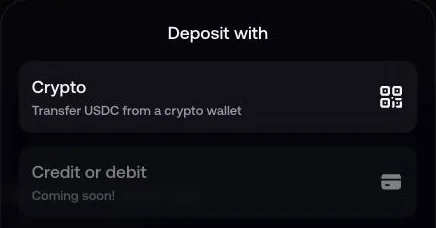
FOMO's help centre gives one asset per network group: Solana, Base, BNB Chain, Monad and Ethereum all receive USDC. Robinhood Chain receives USDG, which converts to your Solana USDC cash balance on deposit. Send the wrong asset, or pick the wrong network in FOMO, and the transfer can be lost for good. Our withdrawal guide covers the same network-matching rule for sending money out.
How to export your FOMO wallet key
Open Settings, then Account, then Export. FOMO shows separate Solana and EVM private keys that you can add to another non-custodial wallet app.
- Open Settings, then AccountIn the FOMO app, open Settings, then Account.
- Tap ExportFOMO shows two separate private keys: one for Solana, one for EVM chains.
- Confirm with biometricsFOMO's help centre says a biometric check, such as Face ID, guards key export, the same as it guards a withdrawal.
- Add the key to another non-custodial walletFOMO's help centre says exporting does not create a new wallet. Adding the key to another app opens the same wallet there.
- Keep the key privateAnyone who has this key can move your funds. FOMO's help centre says no one at FOMO can reverse a confirmed transaction.
FOMO wallet vs a self-managed wallet like Phantom
FOMO's wallet needs no seed phrase. You sign in with Apple or Google instead, and FOMO does not accept an outside wallet. A self-managed wallet such as Phantom works the other way: you hold the seed phrase yourself, and the app accepts a wallet you already have.
FOMO's wallet against a typical self-managed wallet such as Phantom.
| FOMO wallet | A self-managed wallet like Phantom | |
|---|---|---|
| Who builds it | Privy, a third-party wallet infrastructure provider, inside the FOMO app | You install the wallet app yourself |
| Sign-in | Apple ID or Google account, no seed phrase | A seed phrase you write down and store yourself |
| Wallets at signup | Two: one Solana wallet, one EVM wallet | One wallet; you add networks yourself |
| Import an existing wallet | Not supported | Standard feature in most self-managed wallets |
| Export the private key | Yes, to another non-custodial wallet app | Yes; the seed phrase is the key |
| Who can move funds | FOMO's help centre says no one at FOMO can move, hold or access your tokens | Only whoever holds the seed phrase |
| If you lose access | FOMO's help centre says a deleted account loses unexported funds for good | The wallet is lost with the seed phrase; no account recovery |
Can I connect my Phantom wallet to FOMO?
No. FOMO's help centre states: “fomo does not support importing an existing wallet. When you create a fomo account, the app generates a new wallet for you automatically.” FOMO signs you in with Apple or Google, not a wallet connection, so there is no “Connect Phantom” step anywhere in the app.
Two things still work between FOMO and Phantom. You can send USDC from Phantom to your FOMO deposit address, on a matching network, the same as from any wallet or exchange. You can also export your FOMO private key and add it to Phantom, since FOMO's help centre confirms exporting lets you open the same wallet in another non-custodial wallet app.
Is FOMO a crypto wallet?
Not on its own. FOMO is a trading app with a non-custodial wallet built in, so you can buy, sell and hold tokens without a separate wallet app. Products such as Phantom or MetaMask are wallets first. People use them to hold and move funds across many apps. Read our what is FOMO guide for the full picture of the app beyond the wallet.
Security checklist for your FOMO wallet
- Keep your Apple or Google account secure. Your FOMO wallet is tied to that login.
- Turn on device biometrics. FOMO's help centre says biometrics guard app access, withdrawals and key export.
- Export your key before you delete your account. An unexported wallet becomes inaccessible the moment you delete the account.
- Never share your exported private key. FOMO's help centre says no one at FOMO can reverse a confirmed on-chain transaction, so a shared key cannot be undone either.
- Match the network before you send or receive. Use USDC on Solana, Base, BNB Chain, Monad and Ethereum, and USDG on Robinhood Chain.
- Ignore any “connect wallet” prompt on a FOMO page. The real app never asks for one.
Questions people ask
What wallet does FOMO use?
A non-custodial wallet built by Privy, a third-party wallet infrastructure provider named in FOMO’s Terms of Service, section 6. FOMO’s own "Is the fomo App Safe?" page names Privy too. FOMO’s help centre describes the wallet design in detail but does not name the vendor. Signup creates two wallets: one for Solana, one for EVM chains.
Is the FOMO wallet custodial or non-custodial?
Non-custodial. FOMO's help centre states that FOMO never holds your funds on your behalf, and that no one at FOMO can move, hold or access your tokens. Your private key is split into shares and reassembled only briefly, inside secure hardware, to sign a transaction.
How do I find my FOMO wallet address?
Open Deposit, choose Crypto, then pick a network. FOMO shows a deposit address for that network, and that address is your FOMO wallet address on that chain. Match the network to wherever you send funds from, or the transfer can be lost.
How do I export my FOMO wallet?
Open Settings, then Account, then Export. FOMO shows separate Solana and EVM private keys that you can add to another non-custodial wallet app. Exporting does not create a new wallet. The exported key opens the same wallet in a different app.
Can I connect my Phantom wallet to FOMO?
No. FOMO's help centre states that FOMO does not support importing an existing wallet, and every account signs in with Apple or Google, not a wallet connection. You can still send funds from Phantom to your FOMO deposit address, or export FOMO's key into Phantom.
Is FOMO a crypto wallet?
Not on its own. FOMO is a trading app with a non-custodial wallet built in. The wallet exists to hold the funds you trade with inside the app. Products such as Phantom are wallets first, built to hold and move funds across many apps.
Sources
- FOMO Labs, Inc., Terms of Service, 17 August 2026.
- FOMO, Is fomo app safe?.
- FOMO Help Centre, How fomo keeps your crypto secure, 3 September 2026.
- FOMO Help Centre, Creating your fomo account, 23 April 2026.
- FOMO Help Centre, What is fomo?, 12 August 2026.
- FOMO Help Centre, Can I import an existing wallet into fomo?, 19 May 2026.
- FOMO Help Centre, What is a private key and how to protect it.
- FOMO Help Centre, Unauthorized transactions in your wallet.
- FOMO Help Centre, How to deposit funds, 7 September 2026.
- FOMO Help Centre, Supported chains, 12 August 2026.
- FOMO Help Centre, Deleting your account, 10 June 2026.